
- What is an AI Ready ETL Pipeline?
- How Text Becomes an Embedding
- Why Documents Need Chunking
- How Chunking Strategies Affect Quality
- Batch Processing for Embedding APIs
- Loading Embeddings into Vector Storage
- The Complete Pipeline: End to End
- Mental Model: The Library Catalog
- Cost Management and Optimization
- Common Anti-Patterns to Avoid
- Key Takeaways
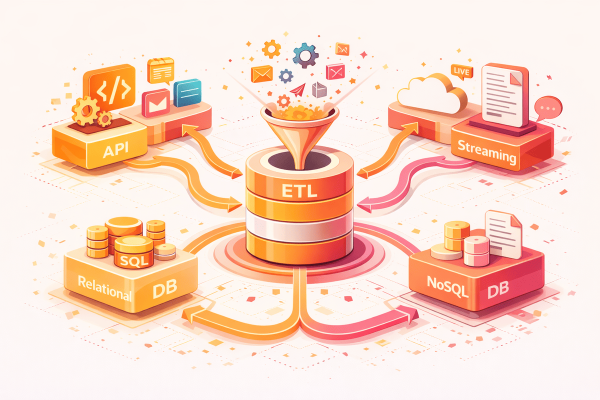
You have a database full of product descriptions. Traditional ETL would clean them and load them into another database. But your AI search feature needs something different: it needs embeddings — lists of numbers that capture the meaning of each description so similar products can be found by semantic search. This is an AI ETL pipeline. The same pipeline patterns apply — extract, transform, load — but the transformations are fundamentally different. Text becomes vectors. Documents become chunks. Records become searchable by meaning, not just keywords.
This work is not about reinventing data engineering. It is about applying proven ETL patterns to a new class of transformations. The architecture stays the same: streaming for memory efficiency, batching for throughput, error handling for resilience. What changes is what happens inside the transformation step. Instead of renaming fields and cleaning phone numbers, you are splitting documents into chunks and generating mathematical representations of meaning.
This builds on the patterns from Memory-Efficient Data Processing. AI transformations are expensive — each embedding API call costs money and takes time — so batch processing and streaming matter even more than in traditional ETL.
What is an AI ETL Pipeline and How is It Different?
An AI ETL pipeline prepares data for use by AI applications. The most common use case today is RAG (Retrieval-Augmented Generation): giving an AI model access to your specific data so it can answer questions about your products, documents, or knowledge base. But the same patterns apply to recommendation systems, classification, and any application that needs to search by meaning.
| Aspect | Traditional ETL | AI ETL Pipeline |
|---|---|---|
| Input | Structured data (rows, columns) | Unstructured or semi-structured text, documents, images |
| Transformation | Field mapping, type conversion, cleaning | Chunking, preprocessing, embedding generation |
| Output | Relational database rows | Vectors in a vector database or vector column |
| Search method | Exact match, keyword, SQL WHERE | Semantic similarity (cosine distance) |
| External dependencies | Source and destination databases | Embedding API (OpenAI, Cohere, local model) |
| Cost model | Compute and storage | Compute, storage, AND per-token API costs |
| Failure mode | Connection errors, schema mismatches | Rate limits, token limits, API timeouts |
The key difference is that AI transformations involve external API calls that cost money, have rate limits, and can fail in ways that traditional database operations do not. A traditional ETL pipeline might process a million records in an hour with nothing but CPU and memory. An AI ETL pipeline processing the same million records might take a full day and cost hundreds of dollars in API fees. This changes how you design error handling, retry logic, and batch sizing.
How Text Becomes an Embedding: Step by Step
Let us trace what happens when a product description gets converted to an embedding. This is the core transformation in any AI ETL pipeline.
Input: A product description
Input text:
  "Comfortable cotton t-shirt, perfect for summer.
   Available in blue, red, and green."

Step 1: Preprocess the text
  Remove extra whitespace → single line
  Normalize unicode characters
  Length check → 89 characters, well under token limit ✓
  Result: "Comfortable cotton t-shirt, perfect for summer. Available in blue, red, and green."

Step 2: Send to embedding API
  Request:
    model: "text-embedding-3-small"
    input: "Comfortable cotton t-shirt, perfect for summer..."
  Response:
    embedding: [0.023, -0.891, 0.445, 0.112, -0.234, ...]
    dimensions: 1536 numbers total
    tokens_used: 18

Step 3: What those numbers mean
  The embedding [0.023, -0.891, 0.445, ...] is a point in
  1536-dimensional space that represents the MEANING of the text.

  Similar descriptions produce similar vectors:
    "Blue cotton summer shirt"  → [0.025, -0.887, 0.442, ...]  (cosine similarity: 0.97)
    "Winter wool sweater"       → [0.892, 0.123, -0.445, ...]  (cosine similarity: 0.23)
When a user searches for “comfortable summer clothing,” the search query also becomes an embedding. The database finds products whose embeddings are closest to the query embedding using cosine similarity. No keyword matching required — the system understands meaning. A search for “beach wear” would also find this t-shirt, even though those exact words never appear in the description.
Why Documents Need Chunking for AI Pipelines
A product description is short — maybe 50 to 200 words. But real-world data includes long documents: user manuals, support articles, legal contracts, technical specifications. These documents can be 10,000 words or more. Embedding models have token limits, and even if they could handle long texts, retrieval works much better with focused chunks.
The reason is precision. If you embed an entire 10,000-word manual as a single vector, that vector represents the average meaning of the whole document. When someone asks “how do I reset the password?”, the vector for the entire manual might be somewhat similar, but a vector for the specific paragraph about password resets would be far more relevant.
Input: 3,000-word user manual

Section 1: Installation (800 words)
Section 2: Configuration (1,200 words)
Section 3: Troubleshooting (1,000 words)

Step 1: Identify chunk boundaries
  Strategy: "paragraph" (respect natural text boundaries)
  Target chunk size: 500 tokens (~375 words)
  Overlap: 50 tokens (preserves context at boundaries)

Step 2: Create chunks with overlap
  Chunk 1: Installation paragraphs 1-3     (480 tokens)
  Chunk 2: Installation paragraphs 2-5     (490 tokens, 50 token overlap)
  Chunk 3: Installation 4-6 + Config 1     (510 tokens)
  Chunk 4: Configuration paragraphs 1-4    (495 tokens)
  ...
  Chunk 8: Troubleshooting paragraphs 4-6  (420 tokens)

Step 3: Attach metadata to each chunk
  {
    "source_id": "manual-v2.1",
    "chunk_index": 4,
    "section": "Configuration",
    "content": "To configure the database connection...",
    "tokens": 495
  }

Result: 8 focused chunks, each with context and metadata
The overlap between chunks ensures that if a relevant answer spans a chunk boundary, the context is not lost. When the user asks “how do I configure the database?”, the chunk containing that answer will be found with high similarity, along with enough surrounding context to be useful.
How Chunking Strategies Affect AI Quality
The chunking strategy directly affects how well your AI application retrieves relevant information. There is no universally best approach — the right strategy depends on your document structure and your use case.
| Strategy | How It Works | Best For | Weakness |
|---|---|---|---|
| Fixed size | Split every N tokens regardless of content | Uniform data, logs, tabular text | Splits mid-sentence, loses context |
| Paragraph | Split at paragraph boundaries | Articles, documentation, books | Paragraphs vary wildly in length |
| Section/heading | Split at H1/H2/H3 boundaries | Structured docs with clear headings | Sections can be very long or very short |
| Semantic | Use AI to detect topic changes | Unstructured text, conversations | Expensive, adds another API call |
| Sliding window | Fixed size with configurable overlap | General purpose, good default | Overlap increases total chunks and cost |
For most production systems, I recommend starting with the sliding window strategy with paragraph-aware boundaries. Split at approximately 500 tokens, but adjust the boundary to the nearest paragraph break. Use 50-100 token overlap. This gives you reasonably sized chunks that respect natural text boundaries without requiring complex logic.
Chunk size matters more than you might expect. Too small (under 100 tokens) and each chunk lacks context. Too large (over 1,000 tokens) and the embedding becomes too general to match specific queries. The 300-500 token range works well for most use cases.
Batch Processing for Embedding APIs
Embedding APIs charge per token and have rate limits. Processing one record at a time is expensive and slow. Batching solves both problems by sending multiple texts in a single API request.
| Approach | API Calls for 1,000 Records | Time | Why |
|---|---|---|---|
| One at a time | 1,000 calls | ~5 minutes (rate limited) | Each call has network overhead |
| Batch of 100 | 10 calls | ~30 seconds | 100x fewer round trips |
| Batch of 500 | 2 calls | ~10 seconds | Near-optimal for most APIs |
Naive approach (1,000 API calls):
  for each record:
    embedding = api.embed(record.text)   # 1 API call per record
    save(record.id, embedding)
  Total: 1,000 API calls, ~5 minutes

Batched approach (10 API calls):
  buffer = []
  for each record:
    buffer.append(record)
    if buffer.length == 100:
      embeddings = api.embed_batch([r.text for r in buffer])  # 1 API call for 100
      for i, record in buffer:
        save(record.id, embeddings[i])
      buffer = []
  Total: 10 API calls, ~30 seconds
The embedding API accepts multiple texts in one request. Batch them together, send once, get all embeddings back. Fewer round trips, faster processing. The total token cost is the same, but the reduced API call count avoids rate limiting and reduces network overhead.
Be careful with batch sizes relative to token limits. If your texts are long, a batch of 100 might exceed the API’s per-request token limit. Monitor the total tokens per batch and adjust accordingly.
Loading Embeddings into Vector Storage
Regular databases store rows and columns and search by exact match. Vector databases store embeddings and search by similarity. The choice of vector storage depends on your scale and existing infrastructure.
| Option | Best For | Pros | Cons |
|---|---|---|---|
| pgVector (PostgreSQL) | Teams already using PostgreSQL | No new infrastructure, familiar SQL | Slower similarity search at large scale |
| Pinecone | Managed, serverless vector search | Fast, no ops overhead, scales automatically | Vendor lock-in, ongoing costs |
| Weaviate | Self-hosted with built-in ML | Open source, flexible schema | Requires ops knowledge to run |
| Qdrant | High-performance self-hosted | Rust-based, very fast | Newer, smaller community |
| ChromaDB | Prototyping and small scale | Simple API, easy setup | Not designed for production scale |
For teams already using PostgreSQL, pgVector is the simplest starting point. You add a vector column to your existing table and query with a similarity operator. No new infrastructure, no new deployment, no new monitoring.
-- Add vector column to existing table
ALTER TABLE products ADD COLUMN embedding vector(1536);

-- Create index for fast similarity search
CREATE INDEX ON products USING ivfflat (embedding vector_cosine_ops);

-- Insert a record with its embedding
INSERT INTO products (id, name, description, embedding)
VALUES (
  1001,
  'Summer T-Shirt',
  'Comfortable cotton t-shirt, perfect for summer...',
  '[0.023, -0.891, 0.445, ...]'::vector
);

-- Search by semantic similarity
SELECT name, description,
       1 - (embedding <=> query_embedding) AS similarity
FROM products
ORDER BY embedding <=> '[0.025, -0.887, ...]'::vector
LIMIT 10;
The <=> operator calculates cosine distance between vectors. Smaller distance means more similar meaning. The query returns products ordered by how closely their meaning matches the search query, regardless of whether they share the same keywords.
The Complete AI ETL Pipeline: End to End
Let us trace a complete RAG (Retrieval-Augmented Generation) preparation pipeline from extraction to searchable vector storage.
| Phase | What Happens | Input | Output |
|---|---|---|---|
| 1. Extract | Pull records from source | Product database (50,000 records) | Raw records with descriptions |
| 2. Preprocess | Clean text for embedding | HTML descriptions, mixed formatting | Clean plaintext, normalized whitespace |
| 3. Chunk | Split long texts into focused pieces | Clean text (varying lengths) | 500-token chunks with metadata |
| 4. Embed | Generate vector representations | Text chunks (batches of 100) | 1536-dimensional vectors per chunk |
| 5. Load | Store in vector-enabled database | Chunks with embeddings | Searchable vector records |
Pipeline: product-embeddings
Started: 2024-01-15 10:00:00

Phase 1 - Extract:
  Source: products table (50,000 records)
  Streaming: 1,000 records at a time
  Duration: 45 seconds

Phase 2 - Preprocess:
  Strip HTML tags: 12,000 records had HTML
  Normalize whitespace: all records
  Remove empty descriptions: 340 records skipped
  Duration: 30 seconds

Phase 3 - Chunk:
  Short descriptions (under 500 tokens): 45,200 → kept as single chunks
  Long descriptions (over 500 tokens): 4,460 → split into 9,800 chunks
  Total chunks: 55,000
  Duration: 15 seconds

Phase 4 - Embed:
  Batches: 550 API calls (100 chunks each)
  Tokens processed: 2,750,000
  Cost: ~$0.28 (text-embedding-3-small)
  Rate limited pauses: 3
  Duration: 8 minutes

Phase 5 - Load:
  Batch inserts: 55 batches of 1,000
  Vector index rebuild: 45 seconds
  Duration: 2 minutes

Total: 11 minutes 30 seconds
Records: 49,660 products → 55,000 searchable chunks
Cost: $0.28 in API fees
The same ETL patterns apply. Memory-efficient streaming ensures you never hold all 50,000 records in memory. Batch processing reduces API calls from 55,000 to 550. Error handling catches failed embeddings and retries them. The data is different but the architecture is identical to traditional ETL, as described in The 6-Phase Pipeline Pattern.
Mental Model: The Library Catalog
Traditional database search is like a library card catalog: you search by title, author, or subject heading. You find books whose metadata exactly matches your search terms. If you search for “summer clothing” you only find items with those exact words.
| Library Concept | Traditional Database | Vector Database |
|---|---|---|
| How you search | Card catalog with exact subjects | Ask a librarian who understands meaning |
| What matches | Only items with exact keywords | Items with similar meaning |
| Finding related items | Manually browse nearby shelves | Automatically surfaces similar items |
| Handling synonyms | Must search each synonym separately | Understands “shirt” and “top” are similar |
| New search terms | Need to update the catalog system | Works with any natural language query |
Vector search is like asking a knowledgeable librarian: “I want something about summer reading for the beach.” The librarian does not look for those exact words. They understand what you mean and point you to novels, magazines, beach guides — things that match the meaning of your request, not just the keywords. Embeddings encode meaning. Vector databases search by meaning. The pipeline is the process of converting your data from searchable-by-keywords to searchable-by-meaning.
Cost Management and Optimization for AI ETL Pipelines
Unlike traditional ETL where the primary costs are compute and storage, AI pipelines have a significant per-record cost from embedding API calls. Managing this cost is a critical part of pipeline design.
| Optimization | How It Reduces Cost | Typical Savings |
|---|---|---|
| Incremental processing | Only embed new or changed records, not the entire dataset | 50-90% on subsequent runs |
| Content hashing | Skip re-embedding records whose content has not changed | Eliminates redundant API calls |
| Smaller embedding models | Use text-embedding-3-small instead of 3-large when quality allows | 5x cheaper per token |
| Local embedding models | Run an open-source model locally instead of API calls | Eliminates per-token cost entirely |
| Preprocessing to reduce tokens | Remove boilerplate, headers, footers before embedding | 10-30% token reduction |
| Optimal chunk sizing | Avoid creating more chunks than necessary | Fewer total embeddings to generate |
Incremental processing is the single biggest cost optimization. On the first run, you embed everything. On subsequent runs, you only embed records that are new or changed since the last run. A content hash (MD5 or SHA-256 of the text) makes this simple: if the hash matches the stored hash, skip the embedding. If it does not match, re-embed.
For each record:
  current_hash = md5(record.description)
  stored_hash  = get_stored_hash(record.id)

  if current_hash == stored_hash:
    SKIP → description has not changed, existing embedding is still valid
  else:
    EMBED → description changed, generate new embedding
    save_hash(record.id, current_hash)

First run: 50,000 records embedded ($0.28)
Second run: 200 changed records embedded ($0.001)
Savings: 99.6%
Common Anti-Patterns in AI ETL Pipelines
These pipelines introduce failure modes that do not exist in traditional data engineering. These anti-patterns come from treating embedding generation like a simple transformation when it is actually an external API dependency with cost, latency, and reliability implications.
| Anti-Pattern | Why It Fails | What to Do Instead |
|---|---|---|
| No retry for API failures | Embedding APIs have transient errors, rate limits, and timeouts | Implement exponential backoff with jitter. Retry 3 times before marking as failed. |
| Re-embedding everything every run | Costs money for unchanged data, wastes time | Use content hashing to detect changes. Only embed what changed. |
| Embedding without preprocessing | HTML tags, boilerplate, and headers waste tokens and pollute meaning | Clean and preprocess text before embedding. |
| No metadata on chunks | When you retrieve a chunk, you cannot trace it back to its source | Attach source_id, section, page number, and chunk_index to every chunk. |
| Ignoring token limits | API silently truncates text that exceeds the limit | Check token count before sending. Split or truncate explicitly. |
| Embedding full documents | Large vectors lose specificity. “Password reset” query matches the whole manual weakly. | Chunk documents into focused 300-500 token pieces. |
The most expensive mistake I have seen is re-embedding entire datasets on every pipeline run. If your dataset has 500,000 records and you re-embed all of them daily, you are spending API money on 499,500 unchanged records. Incremental processing with content hashing eliminates this waste entirely.
Key Takeaways
Building AI ETL pipelines is data engineering, not AI research. The patterns are the same: extract, transform, load. What changes is the nature of the transformation and the cost model.
- Embeddings encode meaning: Text becomes a list of numbers that captures semantic content. Similar texts produce similar vectors.
- Chunk for precision: Split long documents into 300-500 token pieces so retrieval finds specific answers, not general documents.
- Batch API calls: Send 100+ texts per API request. Fewer round trips, faster processing, same cost.
- Process incrementally: Use content hashing to skip unchanged records. This is the biggest cost optimization.
- Attach metadata to chunks: Every chunk needs a source_id, section, and chunk_index so you can trace results back to their origin.
- Start with pgVector: If you already use PostgreSQL, add a vector column. No new infrastructure needed.
- Design for API failures: Embedding APIs have rate limits and transient errors. Implement retry with exponential backoff.
- Preprocess before embedding: Strip HTML, remove boilerplate, normalize text. Cleaner input produces better embeddings and costs less.
AI is not magic. It is data engineering with vectors instead of rows. The same principles apply: clean data in, useful data out, efficient processing in between. The transformations are different — text to embeddings, documents to chunks — but the pipeline architecture is the same architecture that has been moving data reliably for decades.
For more on vector databases and embedding concepts, the Word Embedding article covers the mathematical foundations. For practical vector search, Nearest Neighbor Search explains the algorithms that make similarity search fast at scale.