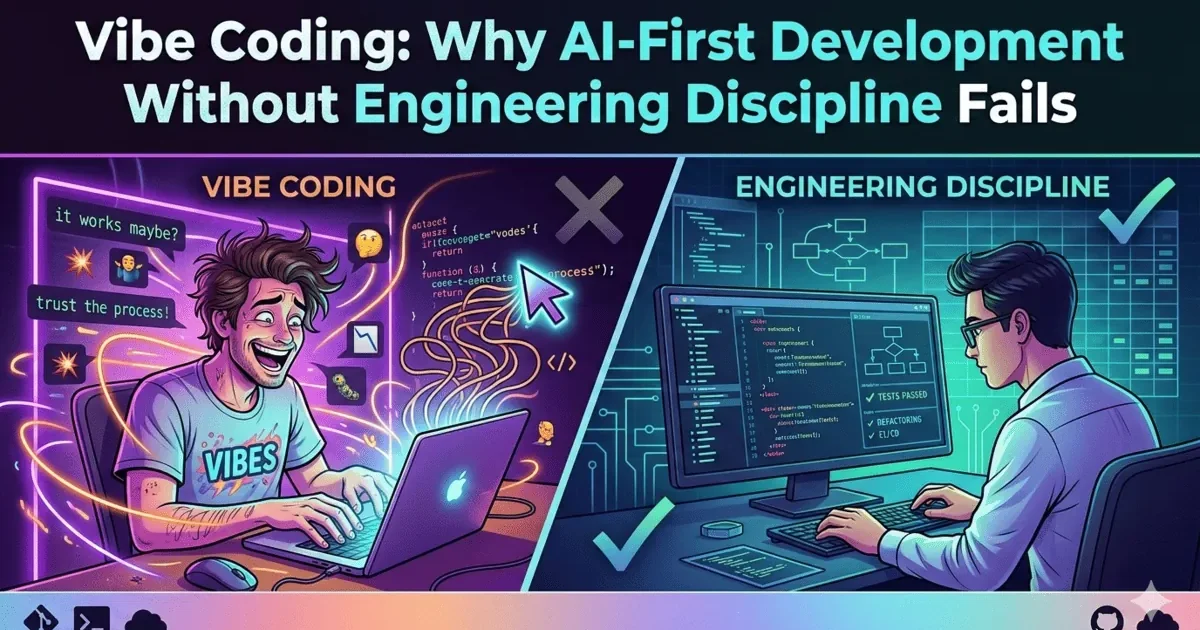
Vibe coding is what happens when developers use AI coding tools to generate code without understanding what the code actually does. The term has gained traction across the software industry in 2025 and 2026, and it describes a very specific problem: developers who rely on AI to produce features, accept the output because it looks correct, and move on without reviewing the architecture, logic, or long-term implications. It sounds productive. It feels fast. But it creates systems that nobody fully understands, and that is where the real trouble begins.
I have been using AI tools daily for software development for over three years now. Tools like Claude, GitHub Copilot, Cursor, and ChatGPT are part of my workflow. They are genuinely useful. But I have also seen what happens when you let AI drive without keeping your hands on the wheel. This post is about that line — the difference between using AI as a tool and letting AI use you as a rubber stamp.
What Is Vibe Coding?
Vibe coding is a development approach where the developer describes what they want, an AI tool generates the code, and the developer accepts it based on whether it seems to work — without deeply understanding or reviewing what was generated. The developer is “vibing” with the AI. They type a prompt, get code back, run it, see that it works, and move on.
On the surface, this looks like 10x productivity. Features ship in hours instead of days. Prototypes appear in minutes. But there is a fundamental difference between code that works and code that is correct. Code that works passes the test you ran today. Code that is correct handles the edge cases, scales under load, remains secure, and can be maintained by someone else six months from now.
Vibe coding consistently produces the first kind of code. And that distinction matters enormously in production systems.
| Aspect | Traditional Development | Vibe Coding |
|---|---|---|
| Code origin | Developer writes code they understand | AI generates code developer accepts |
| Understanding | Deep — developer knows every line | Shallow — developer knows the prompt |
| Review process | Line-by-line review and testing | “Does it run? Ship it.” |
| Speed | Slower but predictable | Fast but unpredictable quality |
| Debugging | Developer traces their own logic | Developer asks AI to fix AI code |
| Architecture | Intentional design decisions | Whatever pattern AI chose |
| Technical debt | Accumulates gradually | Accumulates at the speed of generation |
How Vibe Coding Happens Step by Step
Nobody sets out to vibe code. It happens gradually. Let me walk through the typical progression, because understanding how developers fall into this pattern is the first step toward avoiding it.
Stage 1: The Honeymoon. A developer starts using an AI coding tool. They describe a feature, and the AI generates a working implementation in seconds. It compiles. It runs. The tests pass. The developer is amazed. They used to spend two hours on this, and now it took two minutes. They start using the AI for everything.
Stage 2: The Acceleration. The developer’s output increases dramatically. They are shipping features faster than ever. Their manager is impressed. The backlog is shrinking. The developer stops reading the generated code carefully because it keeps working. Why review 200 lines when the output is consistently correct? They start trusting the AI the way they trust a library — as a black box that just works.
Stage 3: The Accumulation. Weeks pass. The codebase has grown significantly. Most of it was AI-generated. The developer notices something odd: the code works, but they are not entirely sure how some parts work anymore. There are patterns in the codebase they did not choose. Abstractions they would not have written. But everything runs, so they keep going.
Stage 4: The First Crack. A bug appears in production. The developer tries to trace the issue. They find themselves reading AI-generated code they never fully understood. The AI used an approach the developer is not familiar with. Debugging takes three times longer than it should because the developer is learning their own codebase for the first time.
Stage 5: The Cascade. The developer asks the AI to fix the bug. The AI generates a fix that solves the immediate issue but introduces a subtle regression somewhere else. Now there are two bugs. The developer asks the AI again. Three bugs. This is where vibe coding reveals its true cost — not in the code that was generated, but in the code that must be debugged by someone who did not write it and does not fully understand the system the AI built.
I have seen this pattern play out in real projects. Not once, but multiple times. And the scary part is that Stage 1 and Stage 2 feel wonderful. The problems only appear after you have invested weeks of AI-generated code into a system you cannot easily rewrite.
The Infinite Refactor Loop: When AI Fixes Its Own Mistakes
One of the most common consequences of vibe coding is what I call the infinite refactor loop. It works like this:
Step 1: Developer asks AI to build a feature
        → AI generates 400 lines of working code

Step 2: Feature works but code quality is poor
        → Duplicated logic, wrong abstractions, tight coupling

Step 3: Developer asks AI to refactor
        → AI rewrites with new patterns, breaks two existing tests

Step 4: Developer asks AI to fix the broken tests
        → AI patches the tests, introduces a subtle data race

Step 5: Developer asks AI to fix the data race
        → AI adds a mutex that causes a deadlock under load

Step 6: Developer asks AI to fix the deadlock
        → AI restructures the concurrency model, breaking the original feature

Step 7: Back to Step 1 with a different set of problems
The fundamental issue is this: the AI does not have a mental model of your system. It sees the code you show it. It does not understand the architectural decisions behind that code, the constraints your system operates under, or the history of why certain patterns were chosen. Each “fix” is locally correct but globally unaware.
A human developer who built the system would trace the bug to its root cause, understand the ripple effects of a change, and make one targeted fix. Vibe coding produces a series of surface-level patches, each solving the immediate symptom while ignoring the underlying design problem.
Think of it like this: if you have a leaking pipe in your house and you keep applying tape to wherever water appears, you will eventually have tape everywhere and the pipe still leaks. A plumber would find the actual crack and fix it once. Vibe coding is the tape approach applied to software.
The AI Confidence Trap: Why AI-Generated Code Looks Better Than It Is
There is a psychological dimension to vibe coding that makes it particularly dangerous. AI-generated code looks professional. It is well-formatted. It has comments. It uses modern patterns and naming conventions. It often includes error handling and documentation. This creates what I call the AI confidence trap.
When a junior developer writes bad code, it looks bad. The formatting is inconsistent, variable names are unclear, and the structure is messy. You can see the problems. Your instincts fire. You review carefully.
When AI writes bad code, it looks good. The formatting is perfect. The variable names are descriptive. The comments explain what the code does. But underneath the polish, there might be:
- A SQL query that works on 100 rows but will timeout on 10 million rows
- An authentication flow that looks correct but has a subtle token validation gap
- A caching strategy that seems reasonable but causes stale data in multi-server deployments
- An API design that is clean but creates N+1 query problems at scale
- Error handling that catches everything but swallows critical failure signals
The AI confidence trap means that code review standards often drop for AI-generated code. Developers think “the AI knows what it is doing” and review less carefully. This is the opposite of what should happen. AI-generated code needs more scrutiny, not less, precisely because its flaws are hidden behind professional presentation.
| What AI Code Looks Like | What AI Code Might Actually Be |
|---|---|
| Clean, well-commented functions | Duplicated logic across multiple files |
| Proper error handling everywhere | Generic catch blocks that hide real errors |
| Modern design patterns used | Patterns applied where they do not fit |
| Comprehensive documentation | Documentation that describes what code does, not why |
| Tests that all pass | Tests that verify the happy path only |
| Consistent formatting throughout | Inconsistent architecture underneath |
The Real Cost of Vibe Coding: Numbers That Matter
Let us put some real numbers on this. A developer using AI tools can generate 2,000 to 10,000 lines of code per day. Compared to the traditional 200 to 400 lines per day, this seems like a massive gain. But code volume is not the same as code value.
Even if AI-generated code is 90 percent correct — which is generous — the remaining 10 percent creates real problems at scale:
| Metric | Traditional Development | Vibe Coding |
|---|---|---|
| Lines generated per day | 200-400 | 2,000-10,000 |
| Defect rate | ~5% (developer catches most issues) | ~10% (issues hidden in clean-looking code) |
| Defective lines per day | 10-20 | 200-1,000 |
| Time to find defect | Minutes (developer knows the code) | Hours (developer must learn the code first) |
| Debugging cost per defect | Low — trace your own logic | High — reverse-engineer AI logic |
| Codebase comprehension | High — you built it | Decreasing — AI built it |
| Architectural coherence | Intentional — follows your design | Accidental — follows AI patterns |
The math is straightforward. If you generate 5,000 lines per day with a 10 percent defect rate, you are introducing 500 potentially problematic lines daily. Over a month, that is 10,000 lines of code that might contain bugs, security issues, or architectural problems. And each one is harder to find because it is buried inside professional-looking code that you did not write.
This is why some startups that adopted aggressive AI-first development are now reporting massive codebases that nobody fully understands. The code was generated fast, but the understanding was never built. When something breaks, the team is essentially debugging a stranger’s code — except the stranger is an AI that cannot explain its decisions.
Vibe Coding vs Disciplined AI Development
The alternative to vibe coding is not to stop using AI tools. That would be like refusing to use a power drill because you might drill in the wrong place. The alternative is disciplined AI development — using AI as a powerful tool while maintaining engineering rigor.
| Practice | Vibe Coding | Disciplined AI Development |
|---|---|---|
| Prompting | “Build me a user auth system” | “Generate a JWT auth module with refresh tokens, rate limiting, and session invalidation for a Node.js API” |
| Review | Run it, if it works, ship it | Read every line, understand the approach, verify edge cases |
| Architecture | Let AI decide the structure | Define architecture first, let AI implement within constraints |
| Testing | AI writes tests that pass | You define test cases, AI implements them, you verify coverage |
| Debugging | Ask AI to fix AI code | Understand the bug yourself, then use AI to help implement the fix |
| Learning | Knowledge stays with the AI | Knowledge transfers to the developer |
| Ownership | “The AI wrote it” | “I designed it, AI helped build it” |
The key distinction is ownership. In disciplined AI development, you own the architecture. You make the design decisions. You understand why the code is structured the way it is. The AI accelerates the implementation of your decisions. In vibe coding, the AI makes the decisions and you accept them.
This is not a small distinction. It is the difference between using a power tool and being used by one.
Anti-Patterns: What Not to Do with AI Coding Tools
After three years of using AI tools daily, I have identified the most common vibe coding anti-patterns. Each one feels productive in the moment but creates problems later.
| Anti-Pattern | What It Looks Like | Why It Fails | What to Do Instead |
|---|---|---|---|
| The Blank Canvas | “Build me a complete user management system” | AI makes all architectural decisions without constraints | Define the architecture yourself, ask AI to implement specific components |
| The Rubber Stamp | Accepting AI output without reading it | Subtle bugs and security issues pass through undetected | Read every line as if a junior developer wrote it |
| The AI Debugger | Asking AI to fix code that AI generated | Creates the infinite refactor loop | Understand the bug yourself first, then ask AI to help with the specific fix |
| The Copy-Paste Stack | Generating code from multiple AI sessions without integration review | Inconsistent patterns, duplicated logic, conflicting approaches | Maintain a single source of architectural truth, ensure each piece fits the whole |
| The Test Faker | Letting AI write tests for AI-generated code | Tests validate what the code does, not what it should do | Write test cases yourself based on requirements, let AI implement the test code |
| The Context Ignorer | Not providing project context, coding standards, or constraints to the AI | AI generates code that works in isolation but conflicts with your system | Use context files (CLAUDE.md, .cursorrules) to give AI your architectural constraints |
The Blank Canvas is probably the most common anti-pattern. When you ask an AI to “build a feature” without specifying architectural constraints, you are not delegating implementation — you are delegating design. And design is the one thing that should stay with the human engineer. The AI does not know your system’s constraints, your team’s capabilities, your deployment environment, or your scaling requirements. It will generate something that works in isolation but may not fit your system at all.
How to Use AI Without Losing Engineering Discipline
Here is the workflow I use every day. It lets me get the speed benefits of AI tools while maintaining the engineering discipline that keeps systems reliable. This is the opposite of vibe coding — it is intentional, reviewed, and understood.
Step 1: Design first, generate second. Before asking AI to write anything, I decide the architecture. What components are needed? How do they communicate? What are the interfaces? What patterns will I use? I write this down — sometimes as a CLAUDE.md file, sometimes as a quick sketch. The AI gets this context before it generates any code.
Step 2: Small, focused prompts. Instead of “build me a payment system,” I ask for specific, bounded pieces: “Generate a function that validates a Stripe webhook signature and returns the parsed event object.” The smaller the scope, the easier it is to review and understand. Each piece should be something I can read in under five minutes.
Step 3: Read every line. This is non-negotiable. If I cannot explain what a line does, I either ask the AI to explain it or I rewrite it. The moment you stop reading AI output is the moment you start vibe coding. I treat AI-generated code the same way I would treat a pull request from a new team member — with careful, thorough review.
Step 4: Write your own test cases. I define what should be tested based on the requirements and edge cases I know about. The AI can help implement the test code, but the test scenarios come from me. This ensures the tests validate the right behavior, not just the behavior the AI happened to produce.
Step 5: Understand before fixing. When something breaks, I resist the urge to immediately ask the AI to fix it. Instead, I trace the issue myself. I understand the root cause. Then I either fix it myself or ask the AI for a targeted fix with clear constraints: “The issue is X, caused by Y, fix it by doing Z.” This breaks the infinite refactor loop.
Step 6: Regular architecture reviews. Every week, I look at what the AI generated and ask: does this codebase still have a coherent architecture? Are there patterns that conflict? Is there duplicated logic? This is the maintenance that vibe coding skips entirely, and it is what keeps a codebase healthy over time.
┌─────────────────────────────────────────────┐
│  1. DESIGN — You decide the architecture    │
│     Define components, interfaces, patterns │
│     Write it in CLAUDE.md or design doc     │
├─────────────────────────────────────────────┤
│  2. PROMPT — Small, specific, bounded       │
│     One function, one module at a time      │
│     Include context and constraints         │
├─────────────────────────────────────────────┤
│  3. REVIEW — Read every single line         │
│     Can you explain it? Keep it.            │
│     Cannot explain it? Rewrite or clarify.  │
├─────────────────────────────────────────────┤
│  4. TEST — You define what to test          │
│     Edge cases, failure modes, limits       │
│     AI implements, you verify coverage      │
├─────────────────────────────────────────────┤
│  5. DEBUG — Understand before asking AI     │
│     Trace the root cause yourself           │
│     Ask AI for targeted fixes only          │
├─────────────────────────────────────────────┤
│  6. MAINTAIN — Weekly architecture review   │
│     Check coherence, remove duplication     │
│     Ensure patterns are consistent          │
└─────────────────────────────────────────────┘
This workflow takes more time than pure vibe coding. But it produces systems you understand, can debug, and can maintain. The speed gain from AI is still significant — I estimate disciplined AI development is 3 to 5 times faster than traditional development. Vibe coding might be 10 times faster in the short term, but the debugging, refactoring, and rewriting costs bring the long-term speed closer to 0.5 times traditional development.
Why Senior Engineers Are More Valuable in the AI Era, Not Less
Here is the counter-intuitive truth about vibe coding: it is making experienced engineers more valuable, not less. The reason is simple. AI has commoditized code generation. Anyone can generate code now. What AI has not commoditized is the ability to evaluate whether that code is correct, secure, performant, and architecturally sound.
That evaluation ability comes from experience. It comes from having built systems that failed and understanding why they failed. It comes from knowing that a SQL query without an index will perform differently with 100 rows versus 10 million rows. It comes from recognizing that a particular error handling pattern will hide failures in production. These are not things you can learn from a prompt.
The developers who will struggle in the AI era are those whose primary skill was writing code. Code is now cheap. The developers who will thrive are those whose primary skill is system thinking — understanding how components interact, how failures cascade, how architecture decisions compound over time. These skills become the bottleneck when code generation is automated.
| Developer Level | Old Role | New Role in AI Era |
|---|---|---|
| Junior | Write code, fix bugs | Prompt engineer, basic AI code review |
| Mid-level | Implement features, write tests | AI code auditor, integration reviewer |
| Senior | Design systems, mentor juniors | AI system architect, quality guardian |
| Staff/Principal | Technical strategy, cross-team design | AI orchestration architect, technical direction |
The irony of vibe coding is that it creates enormous demand for exactly the skills it bypasses. The more AI-generated code exists in a system, the more that system needs someone who understands architecture, debugging, security, and performance to keep it running. The vibe coders generate the mess. The experienced engineers clean it up.
Key Takeaways
- Vibe coding is accepting AI output without understanding it: It feels fast but creates systems nobody can debug or maintain. The speed is real in the short term, the cost is real in the long term.
- The infinite refactor loop is the biggest risk: Asking AI to fix AI code creates a cycle of patches that never addresses root causes. Break the loop by understanding the bug yourself first.
- AI-generated code needs more review, not less: The AI confidence trap means polished-looking code hides subtle bugs. Treat AI output like a pull request from a new team member — review everything.
- Design decisions must stay with humans: Let AI implement your architecture, not decide your architecture. The Blank Canvas anti-pattern is the most dangerous because it delegates design to a tool that does not understand your system.
- Disciplined AI development is 3 to 5 times faster than traditional coding: You do not need vibe coding to be fast. Design first, prompt small, read every line, test intentionally, debug with understanding.
- The AI era makes experienced engineers more valuable: Code generation is commoditized. System thinking, architecture, debugging, and security evaluation are not. These skills become the bottleneck.
- Context is your best defense against vibe coding: Use CLAUDE.md, .cursorrules, and project documentation to constrain AI output. The more context you provide, the better the AI code fits your system.